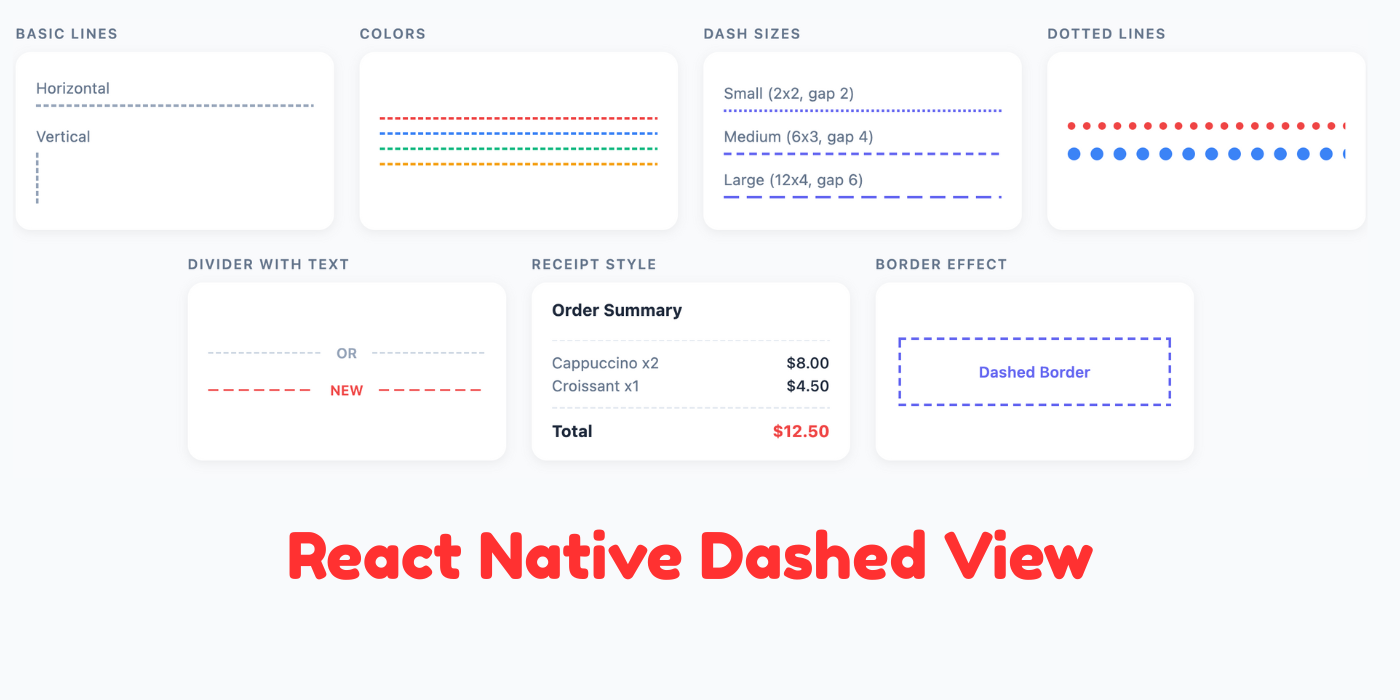
I've cracked the code for shipping JS-only React Native packages. After publishing a few, I built a boilerplate that makes the whole process effortless:
- No native code complexity - Pure JS/TS means no Xcode, no Android Studio, no CocoaPods headaches
- GitHub Actions pipeline - Automated npm publishing on button click. Tag a release, action runs, package is live
- Zero friction - From idea to published package in hours, not days
The hardest part is getting started. Once you publish your first package and see those download numbers tick up... honestly, as a developer, it's hard to explain that feeling. Someone halfway across the world is using code you wrote. Their app works better because of something you built.
And here's the thing - you don't need revolutionary ideas to get started.
How This Package Came to Be
While researching dashed line solutions, I found react-native-dash - a package that does exactly what I needed. One problem: it's no longer maintained. People were sharing patch updates in GitHub issues just to make it work with recent React Native versions.
I thought, why rely on community patches for something this simple? Why not give the community a fresh, maintained alternative?
That's how react-native-dashed-view was born.
There's a phrase we hear all the time: "don't reinvent the wheel." But sometimes reinventing the wheel is exactly how you learn how the wheel was invented. If you're looking for package ideas, browse npm for deprecated or unmaintained packages that people still need. That's low-hanging fruit waiting to be picked.
Now let's get into the package itself.
The Problem
React Native's border styling is inconsistent. On iOS, dashed borders sometimes render correctly. On Android, they often don't. And when you need a standalone dashed line (not a border), you're out of luck.
Common workarounds include:
- SVG libraries (overkill for simple lines)
- Multiple small views in a row (performance issues)
- Platform-specific code (maintenance nightmare)
The Solution
react-native-dashed-view renders dashed lines using optimized native views. It automatically detects orientation based on container dimensions and handles all the edge cases.
Installation
npm install react-native-dashed-view
# or
yarn add react-native-dashed-view
Requires React >= 17.0.0 and React Native >= 0.64.0.
Basic Usage
import { Dash } from 'react-native-dashed-view';

// Horizontal dashed line
<Dash style={{ width: '100%', height: 1 }} />

// Vertical dashed line
<Dash style={{ width: 1, height: 100 }} />
The component automatically determines orientation. When height exceeds width, it renders vertically. Otherwise, it renders horizontally.
Customization
The Dash component accepts several props for styling:
<Dash
  style={{ width: '100%', height: 1 }}
  dashGap={4}        // Space between dashes (default: 2)
  dashLength={8}     // Length of each dash (default: 4)
  dashThickness={2}  // Thickness of dashes (default: 2)
  dashColor="#3b82f6" // Dash color (default: black)
/>
Props Reference
| Prop | Type | Default | Description |
|---|---|---|---|
style | ViewStyle | - | Container style (defines dimensions) |
dashGap | number | 2 | Spacing between dashes |
dashLength | number | 4 | Length of individual dashes |
dashThickness | number | 2 | Width/height of dashes |
dashColor | string | 'black' | Color of the dashes |
dashStyle | ViewStyle | - | Custom style for each dash segment |
Practical Examples
Separator Between List Items
import { View, Text } from 'react-native';
import { Dash } from 'react-native-dashed-view';

function ListWithSeparators() {
  const items = ['Item 1', 'Item 2', 'Item 3'];

  return (
    <View>
      {items.map((item, index) => (
        <View key={item}>
          <Text style={{ padding: 16 }}>{item}</Text>
          {index < items.length - 1 && (
            <Dash
              style={{ width: '100%', height: 1 }}
              dashColor="#e5e7eb"
              dashGap={4}
              dashLength={6}
            />
          )}
        </View>
      ))}
    </View>
  );
}
Dotted Border Effect
import { View } from 'react-native';
import { Dash } from 'react-native-dashed-view';

function DottedBorderBox({ children }) {
  return (
    <View style={{ padding: 16 }}>
      {/* Top border */}
      <Dash
        style={{ position: 'absolute', top: 0, left: 0, right: 0, height: 1 }}
        dashLength={2}
        dashGap={2}
        dashColor="#9ca3af"
      />
      {/* Right border */}
      <Dash
        style={{ position: 'absolute', top: 0, right: 0, bottom: 0, width: 1 }}
        dashLength={2}
        dashGap={2}
        dashColor="#9ca3af"
      />
      {/* Bottom border */}
      <Dash
        style={{ position: 'absolute', bottom: 0, left: 0, right: 0, height: 1 }}
        dashLength={2}
        dashGap={2}
        dashColor="#9ca3af"
      />
      {/* Left border */}
      <Dash
        style={{ position: 'absolute', top: 0, left: 0, bottom: 0, width: 1 }}
        dashLength={2}
        dashGap={2}
        dashColor="#9ca3af"
      />
      {children}
    </View>
  );
}
Full-Width Responsive Divider
Using flex, you can create dividers that automatically fill available space:
<View style={{ flexDirection: 'row', alignItems: 'center' }}>
  <Dash style={{ flex: 1, height: 1 }} dashColor="#d1d5db" />
  <Text style={{ marginHorizontal: 12, color: '#6b7280' }}>OR</Text>
  <Dash style={{ flex: 1, height: 1 }} dashColor="#d1d5db" />
</View>
Vertical Timeline
import { View, Text } from 'react-native';
import { Dash } from 'react-native-dashed-view';

function Timeline({ events }) {
  return (
    <View>
      {events.map((event, index) => (
        <View key={index} style={{ flexDirection: 'row' }}>
          <View style={{ alignItems: 'center', width: 20 }}>
            <View style={{
              width: 10,
              height: 10,
              borderRadius: 5,
              backgroundColor: '#3b82f6'
            }} />
            {index < events.length - 1 && (
              <Dash
                style={{ width: 1, flex: 1, minHeight: 40 }}
                dashColor="#3b82f6"
                dashGap={3}
                dashLength={5}
              />
            )}
          </View>
          <View style={{ flex: 1, paddingLeft: 12, paddingBottom: 24 }}>
            <Text style={{ fontWeight: '600' }}>{event.title}</Text>
            <Text style={{ color: '#6b7280' }}>{event.description}</Text>
          </View>
        </View>
      ))}
    </View>
  );
}
Why Not SVG?
SVG libraries like react-native-svg are powerful but come with tradeoffs:
- Bundle size: SVG libraries add significant weight
- Complexity: Simple lines don't need path commands
- Performance: Native views are more efficient for basic shapes
For complex graphics, use SVG. For dashed lines, this package is lighter and faster.
Start Shipping
If you've been thinking about publishing a package, just do it. Start small, ship it, iterate based on feedback. The tooling is there. The community is supportive. And that first download notification? Worth it.
Links
If you find this useful, give it a star on GitHub. PRs welcome.